B4J: ABMaterial 2.20 Public/2.50 Donators released

abmaterial250

This is just an announcement for the new version(s) of ABMaterial for B4J! It has been a while since I’ve been able to release a new free (public) version, but it is worth the wait!

As the donators already know, 2.20 was a major release, as it tackled a whole new reconnecting system.  If you’re using the free version (pre 2.00), make sure you read the included documents to see how you need to upgrade to the new version!

It was also the first version that introduced the Grid Builder.  With this tool, it is now very easy to create your responsive framework.

2.50 containes a lot of new stuff, as you’ve read in the posts on this blog: ABMChat, ABMPlanner and ABMPercentSlider are only a few of the new things.  Worth mentioning are the major changes in the ABMPivot component, adding new features like exporting to Excel, collapsable rows and columns, new presentations and so on.

Check out the online demo abmaterial.com or download your free copy from the B4J website.

Donators will receive a download link for 2.50 shortly.

Happy Programming!

Alwaysbusy

Click here to Donation if you like my work

B4J: New ABMPlanner and ABMPercentSlider (ABMaterial 2.50)

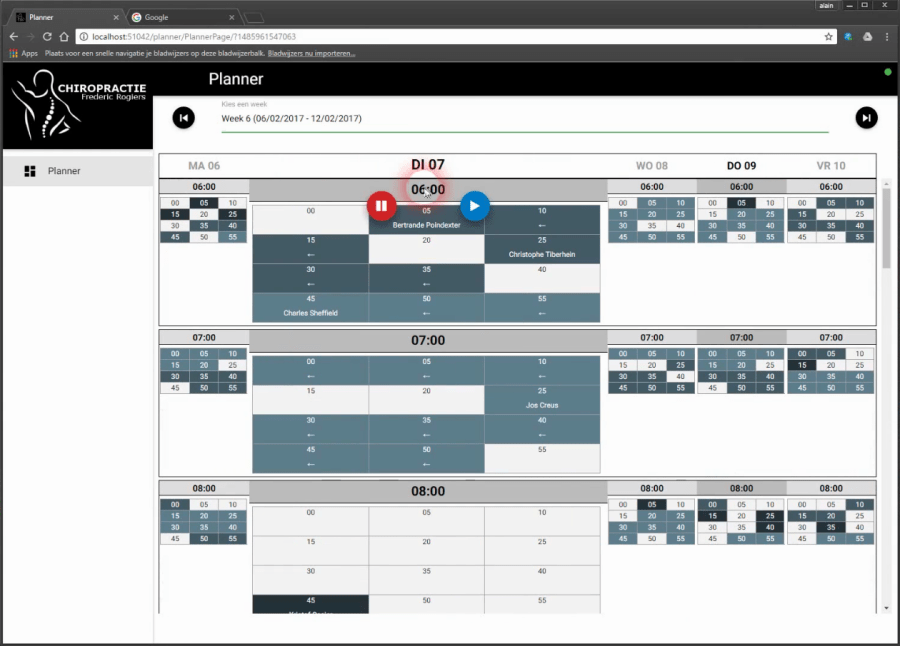
abmplannerA friend of mine, who is a doctor, wanted me to write a scheduling webapp. He had some perticular requests:

1. You should be able to schedule per 5 minutes
2. But still need to be able to see the whole week
3. Wanted only to see the 5 working days (no weekends)
4. Should see from 06:00 to 21:00
5. As his assistant has to ‘fill’ the schedule, he also wanted somehow to show her when he would not be available.

I told him this quickly added up to showing about 840 possible appointments I had to show him on his desktop, tablet and iPhone. “Yes”, was his dry answer…

I didn’t know any such object, so I’ve put on my thinking hat and came up with ABMPlanner for B4J!

Although it has been written especially for his needs, I’m sure it can come in handy for other kind of projects too. For example you can schedule per 5, 10, 15, 20 or 30 minutes. You can set the start/end time of a day. And it can show a full week (including the weekend). You can give each task different colors etc…

It can also show the week as a ‘HeatMap’, so he can see very fast where he can put someone in-between other patients.

The second component ABMPercentSlider (in the video when the modalsheet is opened) is an alternative radio group component. It ranges the possibilities in a ‘percentage’ range, with 5% intervals.

But have a look at the video (app is work in progress and sorry it is in dutch). It can be intimidating at first glance, but once you ‘get’ it, it’s actually a breeze to schedule stuff.

Some relevant code:

BuildPage:

Dim plan As ABMPlanner
plan.Initialize(page, "plan", False, 6,20, 5,False,"black")
plan.UseHeatMap("1,3,6")
page.Cell(2,1).AddComponent(plan)

Adding a task (loading a random generated week):

Sub LoadRandomWeek(StartDay As Long,doRefresh As Boolean)
   Dim plan As ABMPlanner = page.Component("plan")
   plan.ClearPlanner

   Dim Days(7) As String
   Dim Day As Int = DateTime.GetDayOfMonth(StartDay)
   Dim nextDay As Long = StartDay
   Dim perNext As Period
   perNext.Initialize
   perNext.Days = 1
   For i = 0 To 6
     If ActiveDay = -1 Then
       If DateTime.Date(nextDay) = DateTime.Date(DateTime.Now) Then
         ActiveDay = i
       End If
     End If
     Days(i)   = Day
     If Days(i).Length = 1 Then
       Days(i) = "0" & Days(i)
     End If
     nextDay = DateUtils.AddPeriod(nextDay, perNext)
     Day = DateTime.GetDayOfMonth(nextDay)
   Next
   Dim mins As List
   mins.Initialize
   mins.Add(1)
   mins.Add(3)
   mins.Add(6)
   mins.Add(12)
   plan.SetDayLabels("MA " & Days(0), "DI " & Days(1), "WO " & Days(2), "DO " & Days(3), "VR " & Days(4),  "ZA " & Days(5),  "ZO " & Days(6))
   Dim PerTotal As Int = 12

   For i = 0 To 4
     Dim u As Int = 6
     Dim m As Int = 0
     Dim l As Int = 0
     Dim lIndex As Int
     Do While u < 21
       Do While m < PerTotal    
         m = m + Rnd(1,3)          
         lIndex = Rnd(0,3)
         l = mins.Get(lIndex)
         If (u*PerTotal + m + l) < (21*PerTotal) And m < PerTotal And (i <> 2 Or u <=11 ) Then
           Dim patient As String = FirstNames.get(Rnd(0,19)) & " " & LastNames.get(Rnd(0,19))
           counter = counter + 1
           plan.AddTask(NewTask(i, "T" & counter,u,m,l,patient,lIndex)) ' taskid must be a string!                
         End If
         m = m + l
       Loop
       m = m - PerTotal
       u = u + 1
     Loop
   Next

   plan.SetActiveDay(ActiveDay)
   For i = 12 To 20
     plan.SetHourStatus(2,i,False)
   Next
   If doRefresh Then
     plan.Refresh
   End If
End Sub

Events:

Sub plan_ActiveDayChanged(day As Int)
   Log("New day: " & day)
   ActiveDay = day
   ' important to sync the server with the browser!
   Dim plan As ABMPlanner = page.Component("plan")
   plan.SetActiveDay(ActiveDay)
End Sub

Sub plan_MinutesClicked(Value As String)
   Dim spl() As String = Regex.Split(";", Value)
   ' spl(0) is here always 0, as this would contain the menu item clicked.  This is to be uniform with the MenuClicked Value param
   Log("Day: " & spl(1))
   Log("Hour: " & spl(2))
   Log("MinPer5: " & spl(3))
   ' use the ABM.PLANNER_STATUS_ constants to check the status
   Log("Status: " & spl(4))
   Log("Task ID: " & spl(5))

   page.ShowModalSheet("patientafspraak")
End Sub

Sub plan_MenuClicked(MenuType As String, Value As String)
   Dim spl() As String = Regex.Split(";", Value)
   Dim plan As ABMPlanner = page.Component("plan")
   Log("MenuType: " & MenuType)
   Log("Value: " & Value)
   Select Case MenuType
     Case ABM.PLANNER_MENUTYPE_DAY
       ' update the database

       Log("Day: " & spl(1))

       Select Case spl(0)
         Case ABM.PLANNER_MENU_SETFREE
           plan.SetDayStatus(spl(1), True)
         Case ABM.PLANNER_MENU_SETNOTAVAILABLE
           plan.SetDayStatus(spl(1), False)
       End Select

       ' IMPORTANT to perform the action in the browser
       plan.PerfromDayHourMenuAction
     Case ABM.PLANNER_MENUTYPE_HOUR
       ' update the database

       Log("Day: " & spl(1))
       Log("Hour: " & spl(2))

       Select Case spl(0)
         Case ABM.PLANNER_MENU_SETFREE
           plan.SetHourStatus(spl(1), spl(2), True)
         Case ABM.PLANNER_MENU_SETNOTAVAILABLE
           plan.SetHourStatus(spl(1), spl(2), False)
       End Select

       ' IMPORTANT to perform the action in the browser
       plan.PerfromDayHourMenuAction  
     Case ABM.PLANNER_MENUTYPE_MIN
       ' update the database

       Log("Day: " & spl(1))
       Log("Hour: " & spl(2))
       Log("MinPer5: " & spl(3))
       ' use the ABM.PLANNER_STATUS_ constants to check the status
       Log("Status: " & spl(4))
       Log("Task ID: " & spl(5))

       Select Case spl(0)
         Case ABM.PLANNER_MENU_CUT
           cutTaskID = spl(5)
           copyTask = plan.GetTask(spl(5))
           IsCut = True
           myToastID = myToastID + 1
           page.ShowToast("toast" & myToastID, "toastred", "Verplaats " & copyTask.Text & " naar...", 5000)
         Case ABM.PLANNER_MENU_COPY
           copyTask = plan.GetTask(spl(5))
           IsCut = False
           myToastID = myToastID + 1
           page.ShowToast("toast" & myToastID, "toastred", "Kopieer " & copyTask.Text & " naar...", 5000)
         Case ABM.PLANNER_MENU_PASTE
           If IsCut Then
             plan.RemoveTask2(cutTaskID)
           Else
             counter = counter + 1
             copyTask = copyTask.Clone("T" & counter)
           End If
           copyTask.Day = spl(1)
           copyTask.StartHour = spl(2)      
           copyTask.StartMinututesPer = spl(3)
           plan.AddTask(copyTask)      
           plan.Refresh
           If IsCut Then
             myToastID = myToastID + 1
             page.ShowToast("toast" & myToastID, "toastred", copyTask.Text & " verplaatst!", 5000)
           Else
             myToastID = myToastID + 1
             page.ShowToast("toast" & myToastID, "toastred", copyTask.Text & " gekopieerd!", 5000)
           End If
         Case ABM.PLANNER_MENU_DELETE
           plan.RemoveTask2(spl(5))
           plan.Refresh
       End Select

   End Select
End Sub

These are the final components for ABMaterial 2.50. I’m now going to prepare everything for the next release. (updating the demos etc), so donators will receive these new toys shortly…

Alwaysbusy

Click here to Donation and support ABMaterial


B4J: New ABMChat component for ABMaterial 2.50

abmchat

ABMChat is a new cool looking ABMaterial component to create a Web based chat program. The inner workings are very much like Erels ChatRoom, but with a slick interface. This can be a useful control if for example you want to give chat-like support within you own B4J webapp.

Some features:
– Balloon/Bubble-like chat
– Support for some ASCII emoji
– IsTyping ballon

Coding this with B4J and ABMaterial is very easy:

Code ChatShared module:

Sub Process_Globals
   Public AvoidDuplicates As Map
   Private connections As Map
   Public LastMessages As List
   Private IsTypingMap As Map
End Sub

public Sub Init
   AvoidDuplicates = Main.srvr.CreateThreadSafeMap
   connections.Initialize
   LastMessages.Initialize
   IsTypingMap.Initialize
End Sub

public Sub NewConnection(page As ChatPage, pageID As String)
   DateTime.TimeFormat = "HH:mm"

   Dim IdentifyBubble As ABMChatBubble
   IdentifyBubble.Initialize("Server", page.ChatName & " has joined the chat...", "Server " & DateTime.Time(DateTime.Now), "server", "server")
   JoinLeftMessage(pageID, IdentifyBubble)
   connections.Put(pageID, page)
   CallSubDelayed2(page, "CurrentConversation", LastMessages)
End Sub

public Sub NewMessage(pageID As String, Message As ABMChatBubble)
   LastMessages.Add(Message)
   For Each page As ChatPage In connections.Values
     CallSubDelayed2(page, "NewMessage", Message)
   Next
End Sub

public Sub JoinLeftMessage(pageID As String, Message As ABMChatBubble)
   For Each page As ChatPage In connections.Values
     CallSubDelayed2(page, "NewMessage", Message)
   Next
End Sub

public Sub IsTyping(pageID As String, Value As String)
   Dim typeBool As Boolean
   If Value = "" Then
     IsTypingMap.Remove(pageID.ToLowerCase)
   Else
     IsTypingMap.put(pageID.ToLowerCase, "true")
   End If
   If IsTypingMap.Size > 0 Then
     typeBool = True
   End If
   For Each page As ChatPage In connections.Values
     CallSubDelayed3(page, "IsTyping", pageID, typeBool)
   Next
End Sub

public Sub Disconnected(page As ChatPage, pageID As String)
   If connections.ContainsKey(pageID) = False Or connections.Get(pageID) <> page Then Return
   Dim LeaveBubble As ABMChatBubble
   LeaveBubble.Initialize("Server", page.ChatName & " has left the chat...", "Server " & DateTime.Time(DateTime.Now), "server","server")
   JoinLeftMessage(pageID, LeaveBubble)
   connections.Remove(pageID)
   AvoidDuplicates.Remove(pageID.ToLowerCase)
End Sub

Public Sub HasIdentified(pageID As String) As Boolean
   Return connections.ContainsKey(pageID)
End Sub

Relevant Code ChatPage class:

Private Sub WebSocket_Disconnected
   Log("Disconnected")
   If ABMPageId <> "" Then CallSubDelayed3(ChatShared, "Disconnected", Me, ABMPageId)
End Sub

public Sub BuildTheme()
   ' start with the base theme defined in ABMShared
   theme.Initialize("pagetheme")
   theme.AddABMTheme(ABMShared.MyTheme)

   ' add additional themes specific for this page
   theme.AddChatTheme("myChat")
   theme.Chat("myChat").AddBubble("server")
   theme.Chat("myChat").Bubble("server").Color = ABM.COLOR_BLACK
   theme.Chat("myChat").Bubble("server").TextColor = ABM.COLOR_WHITE

   theme.Chat("myChat").AddBubble("me")
   theme.Chat("myChat").Bubble("me").Color = ABM.COLOR_LIGHTBLUE
   theme.Chat("myChat").Bubble("me").TextColor = ABM.COLOR_WHITE

   theme.Chat("myChat").AddBubble("them")
   theme.Chat("myChat").Bubble("them").Color = ABM.COLOR_GREY
   theme.Chat("myChat").Bubble("them").ColorIntensity = ABM.INTENSITY_LIGHTEN2
   theme.Chat("myChat").Bubble("them").TextColor = ABM.COLOR_BLACK
End Sub

public Sub ConnectPage()
'   connecting the navigation bar    

'   init all your own variables (like a List, Map) and add your components
   Dim chat As ABMChat
   chat.Initialize(page, "conversation",600, 450, 255, "mychat")
   chat.AddBubble("Server", "I'm Server, what is your name?", "The Server", "server", "server")

   page.Cell(1,1).AddComponent(chat)

   Dim ChatInput As ABMInput
   ChatInput.Initialize(page, "ChatInput", ABM.INPUT_TEXT, "", False, "")
   ChatInput.PlaceHolderText = "Type your message here...."
   ChatInput.RaiseChangedEvent = True
   page.Cell(2,1).AddComponent(ChatInput)

   ' refresh the page
   page.Refresh
   ' Tell the browser we finished loading
   page.FinishedLoading
   ' restoring the navigation bar position
   page.RestoreNavigationBarPosition
End Sub

Sub ChatInput_Changed(value As String)
   If ChatShared.HasIdentified(ABMPageId) Then
     CallSubDelayed3(ChatShared, "IsTyping", ABMPageId, value)
   End If
End Sub

Sub ChatInput_EnterPressed(value As String)
   DateTime.TimeFormat = "HH:mm"

   If ChatShared.HasIdentified(ABMPageId) Then
     Dim bubble As ABMChatBubble
     bubble.Initialize(ChatName, value, ChatName & " " & DateTime.Time(DateTime.Now), "me", "them")
     CallSubDelayed3(ChatShared, "NewMessage", ABMPageId, bubble)
     CallSubDelayed3(ChatShared, "IsTyping", ABMPageId, "")
   Else
     If value = "" Then Return
     If ChatShared.AvoidDuplicates.ContainsKey(value.ToLowerCase) Then
       Dim chat As ABMChat = page.Component("conversation")
       chat.AddBubble("Server", "Sorry, but " & value & " is already taken!", "The Server", "server", "server")
       chat.Refresh
     Else
       ChatName = value
       ChatShared.AvoidDuplicates.Put(value.ToLowerCase, value)
       Dim chat As ABMChat = page.Component("conversation")
       chat.SetMyFrom(ChatName)
       chat.AddBubble("Server", "Welcome to ABMChat " & ChatName & "!", "The Server", "server", "server")
       chat.Refresh
       CallSubDelayed3(ChatShared, "NewConnection", Me, ABMPageId)
     End If
   End If

   Dim ChatInput As ABMInput = page.Component("ChatInput")
   ChatInput.Text = ""
   ChatInput.Refresh
End Sub

public Sub NewMessage(bubble As ABMChatBubble)
   Dim chat As ABMChat = page.Component("conversation")
   chat.AddBubble2(bubble)
   chat.Refresh
   chat.ScrollToBottom   ' scroll to the end of the chat
End Sub

public Sub IsTyping(pageID As String, typeBool As Boolean)
   Dim chat As ABMChat = page.Component("conversation")
   If pageID <> ABMPageId Then
     If typeBool = False Then
       chat.ThemAreTyping(False, "") 'hide the 'is typing' bubble
     Else
       chat.ThemAreTyping(True, "") ' show the 'is typing' bubble if not yet shown
     End If
     chat.Refresh
     chat.ScrollToBottom   ' scroll to the end of the chat
   End If
End Sub

public Sub CurrentConversation(LastMessages As List)
   If LastMessages.Size > 0 Then
     Dim chat As ABMChat = page.Component("conversation")
     chat.SetConversation(LastMessages)
     chat.Refresh
     chat.ScrollToBottom   ' scroll to the end of the chat
   End If
End Sub

So, there you have it. A complete modern looking multichat webapp that runs on all platforms in just about 150 lines of code!

Alwaysbusy

Click here to Donation and support ABMaterial

B4J: ABMaterial 2.20 with ABMGridBuilder

gridbuilder1

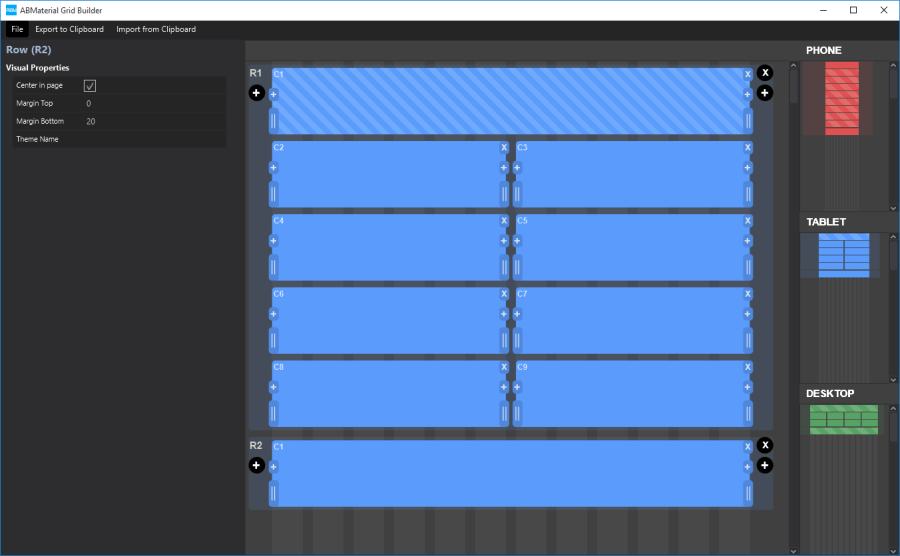
Responsive design is great, but at the same time something that is not so easy to grasp as it works over different levels.  ABMaterial has been using this concept from the very beginning using Materialize CSS and to make it easier, I created a builder for it.

A great start was the implementation done for Bootstrap: Shoelace.io.  I liked the idea of ‘drawing’ your grid.  However, for ABMaterial, I did want more.

Objectives:

  1. Needed to generate B4J source code, not html
  2. I wanted a way to return B4J code back to the builder
  3. Some extra functionalities to insert cells before/after another
  4. Save/Load to re-use designs.
  5. The generated code should include a ‘description’ of the grid.
  6. A ‘light’ and a ‘dark’ theme for night owls like me

Here is a little demonstration on how to work with it:

It generates code something like this:

'PHONE
'╔═══════════════════════════════════════════════════════════════════════════════════╗
'║ 1,1                                                                               ║
'╠═══════════════════════════════════════════════════════════════════════════════════╣
'║ 2,1                       | 2,2                       | 2,3                       ║
'║-----------------------------------------------------------------------------------║
'║ 2,4                       | 2,5                       | 2,6                       ║
'║-----------------------------------------------------------------------------------║
'║ 2,7                       | 2,8                       | 2,9                       ║
'║-----------------------------------------------------------------------------------║
'║ 2,10                      | 2,11                      | 2,12                      ║
'╠═══════════════════════════════════════════════════════════════════════════════════╣
'║ 3,1                                                                               ║
'╠═══════════════════════════════════════════════════════════════════════════════════╣
'║ 4,1                                                                               ║
'╚═══════════════════════════════════════════════════════════════════════════════════╝

'TABLET
'╔═══════════════════════════════════════════════════════════════════════════════════════════════════════════╗
'║ 1,1                                                                                                       ║
'╠═══════════════════════════════════════════════════════════════════════════════════════════════════════════╣
'║ 2,1                      | 2,2                      | 2,3                      | 2,4                      ║
'║-----------------------------------------------------------------------------------------------------------║
'║ 2,5                      | 2,6                      | 2,7                      | 2,8                      ║
'║-----------------------------------------------------------------------------------------------------------║
'║ 2,9                      | 2,10                     | 2,11                     | 2,12                     ║
'╠═══════════════════════════════════════════════════════════════════════════════════════════════════════════╣
'║ 3,1                                                                                                       ║
'╠═══════════════════════════════════════════════════════════════════════════════════════════════════════════╣
'║ 4,1                                                                                                       ║
'╚═══════════════════════════════════════════════════════════════════════════════════════════════════════════╝

'DESKTOP
'╔═══════════════════════════════════════════════════════════════════════════════════════════════════════════════════════════════════╗
'║ 1,1                                                                                                                               ║
'╠═══════════════════════════════════════════════════════════════════════════════════════════════════════════════════════════════════╣
'║ 2,1      | 2,2      | 2,3      | 2,4      | 2,5      | 2,6      | 2,7      | 2,8      | 2,9      | 2,10     | 2,11     | 2,12     ║
'╠═══════════════════════════════════════════════════════════════════════════════════════════════════════════════════════════════════╣
'║ 3,1                                                                                                                               ║
'╠═══════════════════════════════════════════════════════════════════════════════════════════════════════════════════════════════════╣
'║ 4,1                                                                                                                               ║
'╚═══════════════════════════════════════════════════════════════════════════════════════════════════════════════════════════════════╝

cont1.AddRows(1, True,"").AddCells12(1,"")
cont1.AddRows(1, True,"").AddCellsOS(12,0,0,0,4,3,1,"")
cont1.AddRows(2, True,"").AddCells12(1,"")
cont1.BuildGrid ' IMPORTANT!

This description of the grid is very handy when you start adding your components. As you can see in the video, copying the AddRows lines and parsing them back into the builder makes it easy to make changes.

The functionalities are all in the grid itself so you can work fast:

gridbuilder2

ABMGridBuilder is completely written in B4J, so it runs on all desktop platforms (Windows, OSX, Linux).

Tools like this make creating WebApps with ABMaterial and B4J even easier.  It is astonishing how versatile the B4X programming suite from Anywhere Software really is.  It is unique, fast, super stable and full of features nowhere else to be found. I’m so glad I discovered this great tool!

Donators will receive their mail with the download link shortly.

See ya!

Alwaysbusy

Click here to Donation and support ABMaterial


B4J: ABMaterial building a QR Code component

qrcodecomp

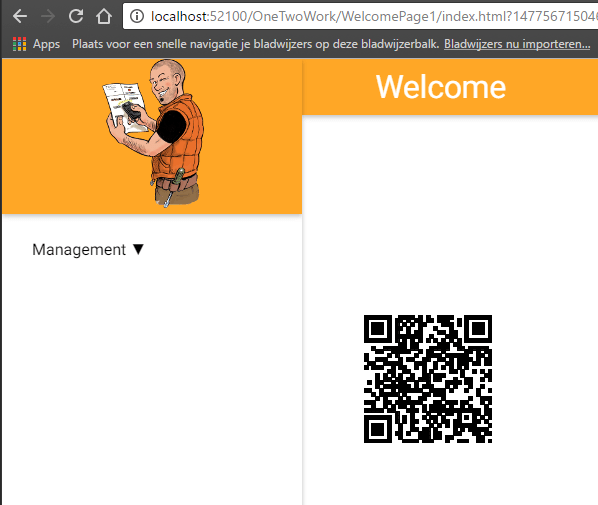
On the B4J forum, liulifeng77 asked the question how he could draw a QR Code in an ABMaterial web page.

I had 5 minutes to spare, so I created the QRCode component using ABMCustomComponent. It is using this javascript library: https://github.com/davidshimjs/qrcodejs

The component class CompQRCode:

'Class module
Sub Class_Globals
     Public ABMComp As ABMCustomComponent
     Public myText As String
   Public myWidth As Int
   Public myHeight As Int
   Public myColorDark As String
   Public myColorLight As String
   Public myCorrectLevel As String
End Sub
'Initializes the object. You can add parameters to this method if needed.
Public Sub Initialize(InternalPage As ABMPage, ID As String, text As String, width As Int, height As Int, colorDark As String, colorLight As String, correctLevel As String)
     ABMComp.Initialize("ABMComp", Me, InternalPage, ID)
     myText = text
   myWidth = width
   myHeight = height
   myColorDark = colorDark
   myColorLight = colorLight
   myCorrectLevel = correctLevel
End Sub
Sub ABMComp_Build(internalID As String) As String
  Return $"
<div id="${internalID}svg"/></div>
<script>var qrcode${internalID};</script>"$
End Sub
' Is useful to run some initalisation script.
Sub ABMComp_FirstRun(InternalPage As ABMPage, internalID As String)
   Dim script As String = $"qrcode${internalID} = new QRCode(document.getElementById("${internalID}svg"), {
  text: "${myText}",
  width: ${myWidth},
  height: ${myHeight},
  colorDark : "${myColorDark}",
  colorLight : "${myColorLight}",
  correctLevel : ${myCorrectLevel}
});"$
     InternalPage.ws.Eval(script, Array As Object(ABMComp.ID))
     ' flush not needed, it's done in the refresh method in the lib
End Sub
' runs when a refresh is called
Sub ABMComp_Refresh(InternalPage As ABMPage, internalID As String)
   Dim script As String = $"qrcode${internalID}.clear();
   qrcode${internalID}.makeCode("${myText}");"$
     InternalPage.ws.Eval(script, Array As Object(ABMComp.ID))
End Sub
' do the stuff needed when the object is removed
Sub ABMComp_CleanUp(InternalPage As ABMPage, internalID As String)
End Sub

Usage (if you want to change its text at run time, put the declaration in Class_globals):

Dim QRCode As CompQRCode

In BuildPage() load the javascript library:

page.AddExtraJavaScriptFile("custom/qrcode.min.js")

In ConnectPage():

QRCode.Initialize(page, "qrcode", "Alwaysbusy's ABMaterial", 128,128, "#000000", "transparent", "QRCode.CorrectLevel.H")
page.Cell(3,1).AddComponent(QRCode.ABMComp)

Et voila, another new component!

Alwaysbusy

Click here to Donation and support ABMaterial

B4J: ABMaterial Public 1.22/Donators 2.00 now released

It has been a long night to get everything ready, but I’m happy to release the new version(s) of ABMaterial for B4J!

2.00 is a major release.  Lots of new stuff and some changes that were really needed in preparation of the upcoming (ABMaterial Abstract Desinger) ABMAD tool.

Highlights of the releases:

1.22: New component ABMPatternLock

ABMPatternLock is yet another authentication method you can use based on the popular Pattern Lock you see in e.g. Android.

patternlock

1.22: ABMContainer can collapse

ABMContainer can be initialized as a collapsable component.  As a collapsable has a header and a body and clicking on the header will collapse/expand the body.  This can be used as an alternative for an ABMCard so you can build your own.

1.22: Support for Font-Awesome icons

If you set: page.UseFontAwesome = true then you can, next to the material icons, also use the Font Awesome Icon library (634 icons in used version Font Awesome 4.6.3)
See fontawesome.io for a list of icons.

fontawesome

2.00: New component ABMChronologylist

The ABMChronologyList is a vertical timeline component. Useful to give an overview of a limited period. It is device aware so e.g. on a phone, all items will be one under each other.

chronology

2.00: New helper ABMSideBar

In ABMaterial 2.00, you will be able to define multiple side bars (sliding in from the right). I’ve tried to mimic the usage of ABMSideBar as much of the existing Side Navigation menu. The tricky part was making it work well with the NavigationBar, on all screensizes.

Check out the online demo abmaterial.com or download your free copy from the B4J website.  Make sure you read the included README.TXT files.  It contains some important info and shows some tips and tricks.

That’s it for now.  Next big release will be all about ABMAD. Until next time!

Alwaysbusy

Click here to Donation if you like my work

B4J: Future steps for ABMaterial

evolution

As ABMaterial has grown to a production ready framework for WebApps using B4J, I recently started a poll on the B4X forum to find out what could be the next steps in its evolution.

I came up with 3 things to do. They would require about the same develop time, but it could be useful to see what the actual users of ABMaterial would like me to work on next.

The possible choices were:

1. ABMXPlay
This is the component you have seen some demos of and will be more for game developers. It still needs a lot of attention before it can be released.

2. B4JS
The Basic to Javascript transpiler is now in its very early stages. It is a tough one to write without finishing ABMXplay first, as the ABMXPlay component would be the first to really benefit from it. The B4J core functions have been covered, but big parts of all ABMComponents need to be refactored to start using B4JS.

3. ABMaterialAbstractDesigner
A full blown Abstract Visual Designer like the one in B4J. This is NOT a code generator but the real deal. Code generators may look nice at first sight, but  have a huge disadvantage: they go one way. ABMAbstractDesigner would work like the B4X ones: you create a layout, develop, change the layout, continue to develop and so on without losing what you have written in code. I’ll use the grid designer I’ve shown as a proof of concept in another post + the possibility to put ABMComponents on them. I’ve done some tests this weekend and it would work very similar as the other B4X tools.

4. Other (please specify)

The poll is now nearly ended and besides some interesting messages with excellent pointers, it was quite obvious from the beginning that the ABMaterialAbstractDesigner (will need a working title for this project, lets call it ABMAD for now…) would be the next part I’ll be working on. (Almost 75% in the poll at the time of writing).  This was also my preferred choice as one user did not really have the patience to wait for me and started to write some kind of code generator.  However, his limited knowledge of the ABMaterial framework has the potential of starting to reflect bad on ABMaterial itself so it is time for me to jump in.

Making ABMAD will happen in a couple of logical steps:

  1. Making the ABMaterial components ready for a designer.  This will ask for some (minor) changes to them so they can be serialized and expose their properties to the designer.
  2. Making a grid builder.  This is the biggest step new users have to overcome nowadays.
  3. Making a properties view for the components.
  4. Drag/Drop facilities to add components to specific cells
  5. Let the ABMaterial library communicate with the Designer output in a similar way as B4X does now.

This will not happen overnight, but the benefits for ABMaterial programmers will be substantial.  This will NOT be a simple code generator. ABMAD will work bidirectional.  And you’ll be able to make layouts in ABMAD and mix them with manually written code like you can do in B4X/ABMaterial now.

Note: To avoid future misunderstandings, the license of ABMaterial 2.0 will include the following statement:

4. YOU AGREE NOT TO DISTRIBUTE, FOR A FEE, AN APPLICATION USING THE LIBRARY THAT, AS ITS PRIMARY PURPOSE, IS DESIGNED TO BE AN AID IN THE DEVELOPMENT OF SOFTWARE FOR YOUR APPLICATION’S END USER. SUCH APPLICATION INCLUDES, BUT IS NOT LIMITED TO, A DEVELOPMENT IDE OR A B4J SOURCE CODE GENERATOR.

Let me explain. The philosophy of ABMaterial (and myself) is giving anyone the chance to easily build great WebApps without having to spend any money. One of the reasons I picked B4J was because it is free. Those who can spare something, donate to stimulate my continuation on the project and in so help giving other not so fortunate people an equal chance to grow. Any derived development tool or generator that uses ABMaterial must follow this philosophy so the tool must be available with 100% of its features for free (not even a ‘limited’ free version is acceptable).

This has no impact on whatever WebApp you make with ABMaterial, but is solely a protection against some ‘money-grubber’ who sees the potential of the ABMaterial framework and thinks of making some easy money using my engine by simply writing a layer above it. Just to be clear, ‘FEE’ here means ANY form of payment or compensation, donations included.

So now that this is out of the way, I think it’s time to step up to the drawing board and start to make some decisions on how ABMAD will look like.

Fun times ahead!

Alwaysbusy

Click here to Donation and support ABMaterial


B4J: Creating your own components in ABMaterial

abmcustgauge

Although ABMaterial has already a lot of components build-in, sometimes you just need a specific one.  I had a question on the B4J forum from CGP who needed a Gauge component.

So let’s build one! CGP had found a very nice library JustGage that would allow him to get the Gauge he wanted. Its value had to be updateable from within B4J, and this was a bit tricky. It looked like we have to be a bit creative because this javascript library did not connect its parent tag with the created JustGage.

We will have to keep track of the JustGage variable ourselves by adding a script tag in the build:

Sub ABMComp_Build(internalID As String) As String
  Return $"<div id="${internalID}"></div><script>var _${internalID};</script>"$
End Sub

The rest of the code is straight forward and we can just follow the javascript instructions and add them in our relative events.

An ABMaterial custom component has 4 important events:

ABMComp_Build(): This is where we have to add the html tag (anchor) for the new component.  In this particular case we also have to add a <script> tag that will hold our justGage variable.  We can then later use this variable to update the Gauge chart.

ABMComp_FirstRun(): Here we can add a script that will run, well, at first run. In most cases, this is where we add the libraries javascript initialization code. The B4J $””$ Smartstrings are in methods like this particulary handy. Use them!

ABMComp_Refresh(): The place where we can adjust properties of the javascript component.  Like for this component, we’ll adjust the value of the gauge.

ABMComp_CleanUp(): An event that is raised when the component is removed.  Could be useful to do some cleanup in the html of set javascript variables to null.

Here is the complete B4J code for our customGauge component:

Sub Class_Globals
   Public ABMComp As ABMCustomComponent
  Public myValue As Int
  Public myLabel As String
End Sub

'Initializes the object. You can add parameters to this method if needed.
Public Sub Initialize(InternalPage As ABMPage, ID As String, value As Int, name As String)
  ABMComp.Initialize("ABMComp", Me, InternalPage, ID)
  myValue = value
  myLabel = name
End Sub

Sub ABMComp_Build(internalID As String) As String
  Return $"<div id="${internalID}"></div><script>var _${internalID};</script>"$
End Sub

' Is useful to run some initalisation script.
Sub ABMComp_FirstRun(InternalPage As ABMPage, internalID As String)
  Dim script As String = $"_${internalID} = new JustGage({
  id: "${internalID}",
  value: ${myValue},
  Min: 0,
  Max: 100,
  relativeGaugeSize: true,
  title: "${myLabel}"
  });"$

  InternalPage.ws.Eval(script, Array As Object(ABMComp.ID))
  ' flush not needed, it's done in the refresh method in the lib
End Sub

' runs when a refresh is called
Sub ABMComp_Refresh(InternalPage As ABMPage, internalID As String)
  Dim script As String = $"_${internalID}.refresh(${myValue});"$
  InternalPage.ws.Eval(script, Null)
End Sub

' do the stuff needed when the object is removed
Sub ABMComp_CleanUp(InternalPage As ABMPage, internalID As String)

End Sub

Now, how do we use our new component in our B4J ABMaterial WebApp?

First, we’ll need to make our custGauge a global variable on the page:

Sub Class_Globals
  Dim custGauge As CustomGauge
  ...

Next, we add the justGauge libraries in the BuildPage().  We’ve placed them in \www\js\custom folder so we can add:

Sub BuildPage()
  ...
  page.AddExtraJavaScriptFile("custom/justgage.js")
  page.AddExtraJavaScriptFile("custom/raphael-2.1.4.min.js")
  ...

In the ConnectPage, we’ll create the actual Gauge and we add a button so we can change its value:

Sub ConnectPage()
  ...
  custGauge.Initialize(page, "custGauge", 25, "Test")
  page.Cell(7,1).AddComponent(custGauge.ABMComp)

  Dim custGaugebtn1 As ABMButton
  custGaugebtn1.InitializeRaised(page, "custGaugebtn1", "", "", "BUTTON", "")
   page.Cell(7,1).AddComponent(custGaugebtn1)
   ...

And finally we add out button code to adjust the value of the Gauge:

Sub custGaugebtn1_Clicked(Target As String)
   custGauge.myValue = Rnd(10,100)
   custGauge.ABMComp.Refresh
End Sub

And just like that, it looks like a fun new component we’ve got in B4J ABMaterial!

Until next time,

Alwaysbusy

Click here to Donation and support ABMaterial


B4J: ABMaterial Public 1.12/Donators 1.20 now released

So, what happened to 1.09, 1.10 and 1.11?
Version 1.09 does not exist. I’ve changed it to 1.10 so I can use the major number as the main release update and the minor number for maintenance releases. e.g. maintenance releases for 1.10 are 1.11,1.12, etc… The next big release is 1.20.

Highlights of the releases:

All components are fully dynamic

In a ‘static’ page, all the components are written in the .html file. In a ‘dynamic’ page they are not. Only when you connect as a user, the components are inserted in their browser.

This seems trivial, but this actually means we can ‘write’ components (html, css and javascript) at run-time, depending on e.g. the user that logged in. Some user is allowed to see one chart, another user another chart. Or one may be able to delete a record from your database, another is not. Or showing a certain modal sheet depending on the user without having to add all possibilities in the HTML. Or show the page in different languages depending on who logged in!

New component ABMTimeLine

ABMTimeline is a component to present a time line of events. Using the ABMTimeLineElement you can create events, with some assets like images.

abmaterial-abmtimeline

New component ABMFlexWall

ABMFlexWall is a simple galarie component for images.  Together with the IsMaterialBoxed=true setting, it creates an easy to use image wall.

abmaterial-flexwall

Speed, the need for speed…

Following all the guidelines of Google, ABMaterial is one of the fastest framesworks around.  Not only in time of development, but this is certainly the case for the user experience. And all done in the background for you!

googletest

Firebase Auth and Storage support (1.20)

ABMaterial is always on top of new technologies.  Latest in line is support of Googles Firebase API. You can use Firebase Auth to login to your ABMaterial (1.20) WebApp and with Storage, you can upload/download files with ease. Together with B4X Firebase support, you can build the most powerful apps ever.

New components ABMSVGSurface, ABMFileInput, ABMTableMutable and ABMPatternLock (1.20)

Always on the move, new components are introduced with every release.  Donators can find more info on these new components in their mail.  More on this blog when 1.20 is released to the public.

So check out the online demo abmaterial.com or download your free copy from the B4J website

Until next time!

Alwaysbusy

Click here to Donation if you like my work


B4J: ABTelegram bots library

Bots are the next hot thing in 2016! So in my spare-spare time I’ve been working on a wrapper for the Telegram API v2.0. It has a rather unconventional API but I’m reworking it to make it very easy to write bots in B4J.

Bots could be very useful as yet another way to ‘talk’ with IoT devices. You can control LEDs, temperatures, ask for stats etc right from within the Telegram Chat App (which runs on about every kind of platform, being the desktop, a browser, iOS, Android, etc…). Or you can, like I did to test the wrapper, write a little game:

ABTelegram

Note: this library is in very early stages so the wrapper is not available for download yet. Full source code of the game will also be available when released.

Some sample code to show you how easy it is to write a bot in B4J (this is not the game code, just some tests):

Code to initialize the library:

Sub Process_Globals
   Dim ABT As ABTelegram
End Sub

Sub AppStart (Args() As String)
   Dim b As MyBot
   b.Initialize
   ABT.RegisterLongPollingBot(b.Bot)

   StartMessageLoop
End Sub

Code for the Bot:

'Class module
Sub Class_Globals
Dim ABT As ABTelegram
Public Bot As ABTLongPollingBot
Private botToken As String = &quot;207189xxxx:yyyyyyyyyyyyyyyyyyyyyyyyyyyyyyyyyyyy&quot;
Private botUserName As String = &quot;zzzzzzzzzBot&quot;
'Private callbackCounter As Int
End Sub

'Initializes the object. You can add parameters to this method if needed.
Public Sub Initialize
Bot.Initialize(&quot;Bot&quot;, Me, botToken, botUserName)
Dim upds As List = Bot.botgetUpdates
For i = 0 To upds.Size - 1
Dim upd As ABTUpdate = upds.Get(i)
Log(&quot;Go update: &quot; &amp; upd.UpdateId)
Next
End Sub

Sub Bot_UpdateReceived(update As ABTUpdate)
Log(&quot;Got an update&quot;)
If update.hasMessage Then
Dim msg As ABTMessage = update.GetMessage
Log(&quot;Message: &quot; &amp; msg.Text)

'        Dim userPhotos As ABTUserProfilePhotos = Bot.BotGetUserProfilePhotos(msg.Chat.id)
'        Log(&quot;photos: &quot; &amp; userPhotos.TotalCount)
'        Dim Photos As List = userPhotos.Photos
'        For i = 0 To Photos.Size - 1
'            Dim photoSizes As ABTPhotoSizes = Photos.Get(i)
'            For j = 0 To photoSizes.Sizes.Size - 1
'                Dim photoSize As ABTPhotoSize = photoSizes.Sizes.Get(j)
'                Dim photoFile As ABTFile = Bot.BotGetFile(photoSize.FileId)
'                Log(photoFile.FilePath)
'
'                Dim job1 As HttpJob
'                job1.Initialize(&quot;Job&quot; &amp; j, Me)
'                job1.Tag = photoFile.FilePath.Replace(&quot;photo/&quot;, &quot;&quot;)
'
'                Dim url As String = &quot;https://api.telegram.org/file/bot&quot; &amp; botToken &amp; &quot;/&quot; &amp; photoFile.FilePath
'                   job1.Download(url)
'               Next
'        Next

'        callbackCounter = callbackCounter + 1
'        Bot.BotSendMessageAsync(callbackCounter, msg.ChatId, &quot;Alweer hallo &quot; &amp; msg.Chat.FirstName)

Bot.BotSendMessage(msg.ChatId, &quot;Using an Emoji &quot; &amp; &quot;:grinning: in the message!&quot;) ' see    https://github.com/vdurmont/emoji-java for a list of emojis

'        Bot.BotSendPhoto(True, msg.ChatId, File.DirApp &amp; &quot;/&quot; &amp; &quot;telegram.png&quot;)

'        callbackCounter = callbackCounter + 1
'        Bot.BotSendDocumentAsync(callbackCounter, True, msg.ChatId, File.DirApp &amp; &quot;/&quot; &amp; &quot;mydocument.pdf&quot;, &quot;mydocument.pdf&quot;)

'        Bot.BotSendDocument(True, msg.ChatId, File.DirApp &amp; &quot;/&quot; &amp; &quot;mydocument.pdf&quot;, &quot;mydocument.pdf&quot;)

Bot.BotSendAudio(True, msg.ChatId, File.DirApp &amp; &quot;/&quot; &amp; &quot;myaudio.mp3&quot;)

'        Bot.BotSendVideo(True, msg.ChatId, File.DirApp &amp; &quot;/&quot; &amp; &quot;myvideo.mp4&quot;)

'        Bot.BotSendSticker(True, msg.ChatId, File.DirApp &amp; &quot;/&quot; &amp; &quot;mysticker.webp&quot;)

'        Bot.BotSendContact(msg.ChatId, &quot;+32496000000&quot;, &quot;Alain&quot;)

'        Bot.BotSendChatAction(msg.ChatId, ABT.CHATACTIONTYPE_TYPING)

'        Bot.BotSendLocation(msg.ChatId, 50.8492, 2.8779)

'        Bot.BotSendVenue(msg.ChatId, 50.8492, 2.8779, &quot;my venue&quot;, &quot;Grote markt 1&quot;)

Bot.BotSendVoice(True, msg.ChatId, File.DirApp &amp; &quot;/&quot; &amp; &quot;telegram.ogg&quot;)

'        Dim keyb As ABTReplyKeyboard
'        Dim rows As List
'        rows.Initialize
'        Dim tmpRow As ABTInlineKeyboardRow
'        tmpRow.Initialize
'        tmpRow.AddButton(&quot;test button&quot;, &quot;http://one-two.com&quot;, &quot;&quot;, &quot;&quot;)
'        rows.Add(tmpRow)
'        keyb.InitializeAsInlineKeyboardMarkup(rows)
'        Bot.BotEditMessageTextEx(msg.ChatId, msg.MessageId, 0, &quot;Extended test&quot;, ABT.PARSEMODE_HTML, False, keyb)

Dim rkeyb As ABTReplyKeyboard
rkeyb.InitializeAsForceReplyKeyboard(False)
Bot.BotSendMessageEx(msg.ChatId, &quot;some test: reply please&quot;, ABT.PARSEMODE_HTML, False, False, 0, rkeyb)

'        Dim rkeyb2 As ABTReplyKeyboard
'        Dim rows2 As List
'        rows2.Initialize
'        For i = 1 To 100
'            Dim tmpRow2 As ABTKeyboardRow
'            tmpRow2.Initialize
'            tmpRow2.AddButton(&quot;Press me&quot;)
'            rows2.Add(tmpRow2)
'        Next
'        rkeyb2.InitializeAsReplyKeyboardMarkup(rows2,False, False, False)
'        Bot.BotSendMessageEx(msg.ChatId, &quot;some test: press the button&quot;, ABT.PARSEMODE_HTML, False, False, 0, rkeyb2)

'        Dim rkeyb3 As ABTReplyKeyboard
'        Dim rows3 As List
'        rows3.Initialize
'        Dim tmpRow3 As ABTInlineKeyboardRow
'        tmpRow3.Initialize
'        tmpRow3.AddButton(&quot;Show image&quot;, &quot;&quot;, &quot;showimage&quot;, &quot;&quot;)
'        rows3.Add(tmpRow3)
'
'        rkeyb3.InitializeAsInlineKeyboardMarkup(rows3)
'        Bot.BotSendMessageEx(msg.ChatId, &quot;some test: press the button&quot;, ABT.PARSEMODE_HTML, False, False, 0, rkeyb3)
End If
If update.hasCallbackQuery Then
Dim cquery As ABTCallbackQuery = update.GetCallbackQuery
Log(&quot;CallbackQuery: &quot; &amp; cquery.data)
Select Case cquery.Data
Case &quot;showimage&quot;
Dim msg As ABTMessage = cquery.Message

Bot.BotSendPhotoEx(True, msg.ChatId , File.DirApp &amp; &quot;/&quot; &amp; &quot;myphoto.jpg&quot;, &quot;A new photo of darth vader!&quot;,False, 0, Null )
Bot.BotSendLocation(msg.ChatId, 50.8492, 2.8779)
Bot.BotEditMessageText(msg.ChatId, msg.MessageId, &quot;&quot;, &quot;Shown&quot;)
End Select
End If
If update.hasInlineQuery Then
Dim ciquery As ABTInlineQuery = update.GetInlineQuery
Log(&quot;InlineQuery: &quot; &amp; ciquery.Query)
If ciquery.Query = &quot;loc&quot; Then
Dim lstResults As List
lstResults.Initialize
Dim myanswer As ABTInlineQueryResult
myanswer.InitializeAsLocation(&quot;1&quot;, 50.8492, 2.8779, &quot;Your location&quot;)
lstResults.Add(myanswer)
Bot.BotAnswerInlineQuery(ciquery.Id, lstResults)
End If
End If
If update.hasChosenInlineResult Then
Dim ccresult As ABTChosenInlineResult = update.GetChosenInlineResult
Log(&quot;ChosenInlineResult: &quot; &amp; ccresult.Query)
End If
End Sub

Sub Bot_AsyncSendReceived(methodType As String, callbackId As String, success As Boolean, asyncObject As ABTObject)
Log(&quot;Async method: &quot; &amp; callbackId &amp; &quot; &quot; &amp; methodType &amp; &quot; &quot; &amp; success)
If success And asyncObject &amp;lt;&amp;gt; Null Then
If asyncObject.objectType=&quot;ABTMessage&quot; Then
Dim message As ABTMessage = asyncObject
Log(&quot;Async callback: &quot; &amp; message.MessageId)
End If
End If
End Sub

Sub JobDone (Job As HttpJob)
Log(&quot;JobName = &quot; &amp; Job.JobName &amp; &quot;, Success = &quot; &amp; Job.Success)
If Job.Success = True Then
Dim fSave As OutputStream = File.OpenOutput(File.DirApp, Job.tag, False)
File.Copy2(Job.GetInputStream, fSave)
fSave.Close
Else
Log(&quot;Error: &quot; &amp; Job.ErrorMessage)
End If
Job.Release
End Sub

Alwaysbusy

Click here to Donation if you like my work


B4J: ABMaterial Public 1.06/Donators 1.07 now released

The public version 1.06 of ABMaterial is now available from the B4J website!

Some highlights on this public release:

Theme and controls have a Colorize() method to quickly change a theme
Getting more out of the Theme system. Just by using the one single line in B4J, theme.Colorize(myColor), you can change the base color of ABMaterial. You can of course still tune it manually.

Colorizing a theme in one line in ABMaterial

ABMDataTimeScroller
New component to let the user choose a date through a scroller.  Can be used to get the date, the time or both. See the demo for more.

The DateTime Scroller of ABMaterial

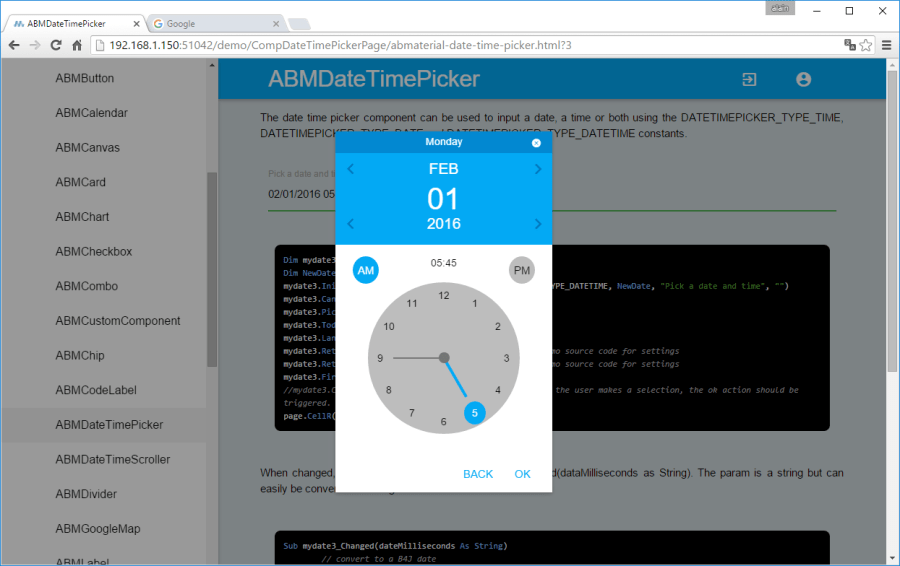
ABMDateTimePicker
Alternative component to let the user choose a date/time.  The date can be picked on a calendar, the time on a clock. See the demo for more.

The Date picker of ABMaterial

The Time picker of ABMaterial

Speed gain by using minified versions of the javascript/css files
This is just the first step in speeding up ABMaterial and the user experience both on a desktop and a mobile device. I continue searching for methods to make ABMaterial even faster!

Read the README1.06.TXT for the full release notes.

Download ABMaterial Public version 1.06

Donators will receive an email with the download link to ABMaterial 1.07 containing two new controls, ABMEditor and ABMSocialShare.  A optimized TreeView and Google Analytics support is also included!

Happy programming!

Alwaysbusy

Click here to Donation if you like my work


B4J: Using Google Analytics with ABMaterial

ABMaterial and Google Analytics

As ABMaterial is a hybrid website/webapp framework, you can use SEO (see previous article), and now even Google Analytics in the upcoming version 1.07. This article shows how you can use Google Analytics by adding just one extra line of B4J code on your page!

Note: This post is an ABMaterial adaptation of an excellent article for beginners on Google Analytics by Kristi Hines. Just to make it easier for you, I used and changed it just up to where ABMaterial comes in.  At the end of this post you can then continue reading the original one for more tips and tricks.

Why every website/webapp needs Google Analytics

Here are just a few of the many questions about your ABMaterial website/webapp that you can answer using Google Analytics.

  • How many people visit my website/webapp?
  • Where do my visitors live?
  • What websites send traffic to my website/webapp?
  • What marketing tactics drive the most traffic to my website/webapp?
  • Which pages on my website/webapp are the most popular?
  • How many visitors have I converted into leads or customers?
  • Where did my converting visitors come from and go on my website/webapp?
  • What content do my visitors like the most?

There are many, many additional questions that Google Analytics can answer, but these are the ones that are most important for most website/webapp owners. Now let’s look at how you can get Google Analytics on your ABMaterial website/webapp.

How to install Google Analytics

First, you need a Google Analytics account. If you have a primary Google account that you use for other services like Gmail, Google Drive, Google Calendar, Google+, or YouTube, then you should set up your Google Analytics using that Google account. Or you will need to create a new one.

This should be a Google account you plan to keep forever and that only you have access to. You can always grant access to your Google Analytics to other people down the road, but you don’t want someone else to have full control over it.

Big tip:

don’t let anyone (your web designer, web developer, web host, SEO person, etc.) create your website’s Google Analytics account under their own Google account so they can “manage” it for you. If you and this person part ways, they will take your Google Analytics data with them, and you will have to start all over.

Set up your account and property

Once you have a Google account, you can go to Google Analytics and click the Sign into Google Analytics button. You will then be greeted with the three steps you must take to set up Google Analytics.

google analytics setup

After you click the Sign Up button, you will fill out information for your website.

For the absolute beginner’s guide, we’re going to assume you have one website and only need one view (the default, all data view. The setup would look something like this.

new account information google analytics

Beneath this, you will have the option to configure where your Google Analytics data can be shared.

configuring shared info for google analytics

Our google account is setup and all we need now is get our Tracking ID and add it in ABMaterial.

Click the Get Tracking ID button. You will get a popup of the Google Analytics terms and conditions, which you have to agree to. Then you will get your Google Analytics Tracking ID.

Tracking ID in the Google Analytics Console

In our ABMaterial app, all we have to do is add this single line to each of our pages in the BuildPage() method:

page.Initialize(Name, “/ws/appName/Name, False)
page.UseGoogleAnalytics(“UA-64248213-1”, Null)

I guess it can’t get much easier, no?

If you want to go deeper into Google Analytics, I suggest reading the original article The Absolute Beginner’s Guide to Google Analytics.

ABMaterial 1.07 will be realeased in a couple of weeks for the donators. Addidtional to Google Analytics support, two new components ABMEditor and ABMSocialShare will be included, but more on this in a next article.

Happy programming!

Alwaysbusy


B4J: ABMaterial Public 1.05/Donators 1.06 now released

The public version 1.05 of ABMaterial is now available from the B4J website!  Three new controls:

ABMSlider: Add a slider for values with a wide range.

Range

ABMRange: Add a range slider for values with two handlers.

Slider

ABMCustomControl: add your own components to the ABMaterial framework.

CustomComponent

Some more highlights on this release:

  • Complete rewrite of the Refresh system
  • Material Icon Fonts are now loaded locally
  • Disable the back button in the browser
  • ABMModalSheet FULL size option
  • LocalStorage support
  • ABMPlatform object containing basic info on the users browser and device
  • Integrate variables for SEO-optimization
  • Responsive tables

Read the README1.05.TXT for the full release notes.

Download ABMaterial Public version 1.05

Donators will receive an email with the download link to ABMaterial 1.06 containing two new controls, ABMDataTimeScroller and ABMDateTimePicker.

Happy programming!

Alwaysbusy

Click here to Donation if you like my work

B4J: ABMaterial WebApps and SEO (Search Engine Optimization)

SEO

A feedback case I got from one of the users of ABMaterial, Herbert, was the question how ABMaterial for B4X coped with SEO-optimization. To be perfectly honest, I hadn’t really though about it. I  had a couple of things already, like headers, bold text, a page title and description.

As any good programmer,  if it looks nice, is user friendly and works as expected, my work is done and users will find and like it. No?

And it kept me thinking.  So this morning, lying awake at 4  o’clock (sleeping is highly overrated IMHO and an invention of the Bed Consortium, but I’m sidetracking), I decided to learn more about SEO and how it could be implemented in ABMaterial for B4X.

Herbert gave me some links, so I started reading up.

Looked like I had some things right already, but ABMaterial could use some polishing.

For starters, I added some extra properties to the ABMaterial page object that will be saved in the generated html file:

pageTitle: very important, pick good keywords
pageDescription: keep it around 140 to 160 chars
pageKeywords: a comma delimited string containing your page keywords
pageHTMLName: it is always index.html in ABMaterial, but it’s better to give it some name using keywords, like ‘abmaterial-custom-component.html’, use hyphens (-) between words to improve readability
pageSiteMapPriority: a value between 0.00 and 1.00, see further
pageSiteMapFrequency: how frequently the page is updated (never, none, always, hourly, weekly, yearly, …), see further

Headers:

Covered!  ABMaterials labels can have headers like <h1>, <h2> so we’re ok.  Tip: create only one <h1>!

<h1>Most Important</h1>
<h2>Second Most Important</h2>
<h3>Third Most Important</h3>

Bold:

Got it: You can use markers like {B}{/B} in labels to set text in bold/strong.

Use tag in a image:

Ah, needed some changes.  I misused it.  Thinking ‘who the #?@! can’t show images anymore these days‘, I used it as an image toggle property.  Changed it now so it can be used properly.

Hyperlinks:

Added some extra markers {AS}{/AS} in the ABMLabel Component so you can add a title.

{AL}http://www.website.com/page.html{AS}keyword{/AS}{AT}my visible text{/A}

will result in:

<a rel=”nofollow” target=”_black” href=”http://www.website.com/page.html” title=”keyword”>my visible text</a>

sitemap.xml and robots.txt:

The Sitemaps protocol allows a webmaster to inform search engines about URLs on a website that are available for crawling. ABMaterial has the possibility to generate a sitemap.xml file and a robots.txt file (for sites like Ask.com).

What does it look like Alwaysbusy, I hear you ask. Well, something like this:

<?xml version=”1.0″ encoding=”UTF-8″?>
</pre>
<urlset
xmlns=”http://www.sitemaps.org/schemas/sitemap/0.9”
xmlns:xsi=”http://www.w3.org/2001/XMLSchema-instance”
xsi:schemaLocation=”http://www.sitemaps.org/schemas/sitemap/0.9
http://www.sitemaps.org/schemas/sitemap/0.9/sitemap.xsd”&gt;
<!– created with ABMaterial and B4J –>
<url>
<loc>https://alwaysbusycorner.com/index.html</loc&gt;
<lastmod>2016-01-16T11:11:16+00:00</lastmod>
<changefreq>monthly</changefreq>
<priority>1.00</priority>
</url>
<url>
<loc>https://alwaysbusycorner.com/alwaysbusy-abmaterial-introduction.html</loc&gt;
<lastmod>2016-01-16T11:11:16+00:00</lastmod>
<changefreq>monthly</changefreq>
<priority>0.50</priority>
</url>
<url>
<loc>https://alwaysbusycorner.com/alwaysbusy-abmaterial-customcomponent.html</loc&gt;
<lastmod>2016-01-16T11:11:16+00:00</lastmod>
<changefreq>yearly</changefreq>
<priority>0.50</priority>
</url>
</urlset>

To generate this is easy in ABMaterial, and needs just a couple of things:

  1. In ABMShared, add a property  public AppPublishedStartUrl as String = “http://yoururl.com”.

  2. In the initalize() method of ABMApplication, add ‘ABM.AppPublishedStartUrl=ABMShared.AppPublishedStartUrl.

  3. In the BuildPage() method of each page, set page.PageHTMLName=”your-good-keywords.html”

  4. Also in BuildPage(), add page.PageSiteMapPriority = “0.50” (number between 0.00 and 1.00, and don’t set them all to 1.00, that makes them equally important)

  5. Also add page.PageSiteMapFrequency = ABM.SITEMAP_FREQ_MONTHLY (use one of the contstants)

  6. If you use a ABMNavigationBar, update the url of each sidebar item in ABMShared, e.g. page.NavigationBar.AddSideBarItem(“Contacten”, “Contacten”, “mdi-action-dashboard”, “../StartPage/your-good-keywords.html”)

  7. In ABMApplication, also change your InitialPage=”your-good-keywords.html”

  8. In ABMApplication, change ‘index.html’ in the AddPage() method to Page.PageHTMLName

When you start your app, the sitemap.xml and robots.txt files will be generated next to your apps html file. After publishing it to your final site, you let the search engines know you want to submit your site.

You should be able to use these sitemap-submission URLS. Put the full URL to your sitemap, including http://, after the = sign:

http://www.google.com/ping?sitemap=

http://www.google.com/webmasters/sitemaps/ping?sitemap=

http://www.bing.com/webmaster/ping.aspx?sitemap=

http://submissions.ask.com/ping?sitemap=

http://www.didikle.com/ping?sitemap=

So, you’re already one step ahead of many other tools when you use B4J and ABMaterial!

Of course, your content will be the most important part to atract users and get high rankings in the search engines, but it never hurts giving them some help.

If any SEO expert reading this article has some other ideas, please post them.

ABMaterial 1.05, supporting all this, will be send to the donators early next week. Quite some goodies included in this release!

Head to the B4X website, download your free copy of B4J and go to the forum to download the ABMaterial framework.

Alwaysbusy

Some good rerading on SEO:

https://moz.com/beginners-guide-to-seo

http://webdesign.about.com/od/seo/tp/seo_tips_and_tricks.htm

SEO Heading Tags

What are Meta Descriptions

Click here to Donation if you like my work

B4J: 4.0 now supports HTTP/2, perfect tool for my ABMaterial framework

ABMaterial

You all know me as a Xojo fanatic, but lately I lost a bit of interest because the focus of the last year was so much about Apple, and Windows/Linux was a bit forgotten.

So I got back to my other favorite, B4X.  And what a pleasant ride it has been so far! It truly is a far to little known gem with so much power under the hood. Creating apps for Android, iOS, Desktop and Server apps is a blast.

Being able to share code between devices, having a simple but powerful (free) IDE, a very active community and a developer that really listens was quite refreshing.

My next project was writing a Material Design framework for Web Apps, without having to write a single line of HTML, CSS or JavaScript.  And quickly, it became obvious B4J was the one tool that could do it. ABMaterial was born.

Using very little code, you’re able to write beautiful (based on Material CSS) and powerful (B4J really stands out here) WebApps.  The enthusiastic crowd at the forum has pushed me through several nights continuing to write on the framework and has made me, although some polishing is still needed, a very happy camper.

It will be very useful to write WebApps (automatically adapting to the screen size of your device), and I even see it to be great to write nice interfaces for your Raspberry Pi projects. It consists of 25+ ‘themeable’ controls and some easy-to-use helpers to design your layouts.

To prove B4J is really on edge with the latest technologies, Erels latest release 4.0 for Christmas now supports HTTP/2. Benchmarks showed a big difference in speed and will undoubtedly be very useful for mobile devices.

I’ve set up a live demo of ABMaterial on my modest media center computer here. So, be gentle with her…

Or if you want to try it out yourself, head to the B4X website, download your free copy of B4J and go to the forum to download the ABMaterial framework.  The current ‘public’ version is 1.03.  Donators get updates (1.04 as at time of writing) about 2 to 3 weeks beforehand so I’m able to better control questions/feature requests or bugs (aaarrhh!).

I wish you all some very happy Holidays and I hope I’ll see you all next year for some more fun programming projects!

Alwaysbusy

Click here to Donation if you like my work