B4J: ABMaterial 2.20 with ABMGridBuilder

gridbuilder1

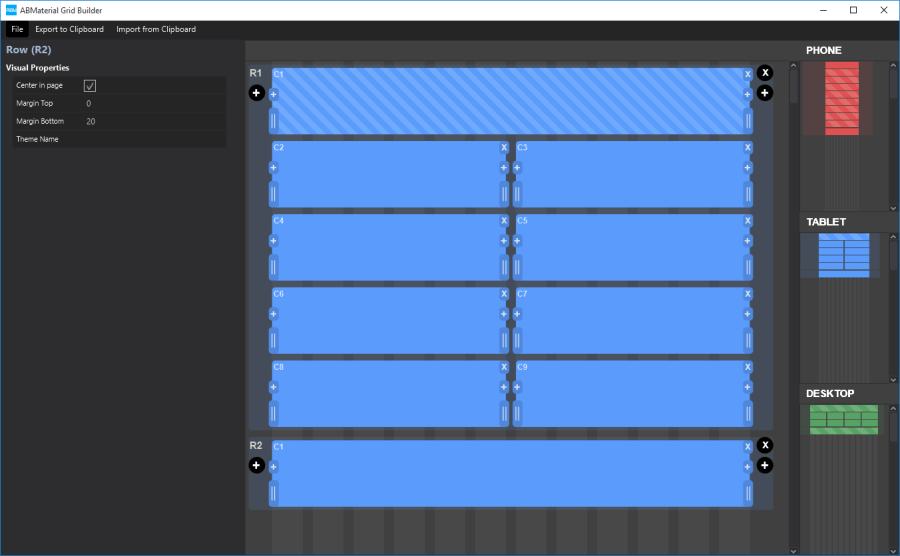
Responsive design is great, but at the same time something that is not so easy to grasp as it works over different levels.  ABMaterial has been using this concept from the very beginning using Materialize CSS and to make it easier, I created a builder for it.

A great start was the implementation done for Bootstrap: Shoelace.io.  I liked the idea of ‘drawing’ your grid.  However, for ABMaterial, I did want more.

Objectives:

  1. Needed to generate B4J source code, not html
  2. I wanted a way to return B4J code back to the builder
  3. Some extra functionalities to insert cells before/after another
  4. Save/Load to re-use designs.
  5. The generated code should include a ‘description’ of the grid.
  6. A ‘light’ and a ‘dark’ theme for night owls like me

Here is a little demonstration on how to work with it:

It generates code something like this:

'PHONE
'╔═══════════════════════════════════════════════════════════════════════════════════╗
'║ 1,1                                                                               ║
'╠═══════════════════════════════════════════════════════════════════════════════════╣
'║ 2,1                       | 2,2                       | 2,3                       ║
'║-----------------------------------------------------------------------------------║
'║ 2,4                       | 2,5                       | 2,6                       ║
'║-----------------------------------------------------------------------------------║
'║ 2,7                       | 2,8                       | 2,9                       ║
'║-----------------------------------------------------------------------------------║
'║ 2,10                      | 2,11                      | 2,12                      ║
'╠═══════════════════════════════════════════════════════════════════════════════════╣
'║ 3,1                                                                               ║
'╠═══════════════════════════════════════════════════════════════════════════════════╣
'║ 4,1                                                                               ║
'╚═══════════════════════════════════════════════════════════════════════════════════╝

'TABLET
'╔═══════════════════════════════════════════════════════════════════════════════════════════════════════════╗
'║ 1,1                                                                                                       ║
'╠═══════════════════════════════════════════════════════════════════════════════════════════════════════════╣
'║ 2,1                      | 2,2                      | 2,3                      | 2,4                      ║
'║-----------------------------------------------------------------------------------------------------------║
'║ 2,5                      | 2,6                      | 2,7                      | 2,8                      ║
'║-----------------------------------------------------------------------------------------------------------║
'║ 2,9                      | 2,10                     | 2,11                     | 2,12                     ║
'╠═══════════════════════════════════════════════════════════════════════════════════════════════════════════╣
'║ 3,1                                                                                                       ║
'╠═══════════════════════════════════════════════════════════════════════════════════════════════════════════╣
'║ 4,1                                                                                                       ║
'╚═══════════════════════════════════════════════════════════════════════════════════════════════════════════╝

'DESKTOP
'╔═══════════════════════════════════════════════════════════════════════════════════════════════════════════════════════════════════╗
'║ 1,1                                                                                                                               ║
'╠═══════════════════════════════════════════════════════════════════════════════════════════════════════════════════════════════════╣
'║ 2,1      | 2,2      | 2,3      | 2,4      | 2,5      | 2,6      | 2,7      | 2,8      | 2,9      | 2,10     | 2,11     | 2,12     ║
'╠═══════════════════════════════════════════════════════════════════════════════════════════════════════════════════════════════════╣
'║ 3,1                                                                                                                               ║
'╠═══════════════════════════════════════════════════════════════════════════════════════════════════════════════════════════════════╣
'║ 4,1                                                                                                                               ║
'╚═══════════════════════════════════════════════════════════════════════════════════════════════════════════════════════════════════╝

cont1.AddRows(1, True,"").AddCells12(1,"")
cont1.AddRows(1, True,"").AddCellsOS(12,0,0,0,4,3,1,"")
cont1.AddRows(2, True,"").AddCells12(1,"")
cont1.BuildGrid ' IMPORTANT!

This description of the grid is very handy when you start adding your components. As you can see in the video, copying the AddRows lines and parsing them back into the builder makes it easy to make changes.

The functionalities are all in the grid itself so you can work fast:

gridbuilder2

ABMGridBuilder is completely written in B4J, so it runs on all desktop platforms (Windows, OSX, Linux).

Tools like this make creating WebApps with ABMaterial and B4J even easier.  It is astonishing how versatile the B4X programming suite from Anywhere Software really is.  It is unique, fast, super stable and full of features nowhere else to be found. I’m so glad I discovered this great tool!

Donators will receive their mail with the download link shortly.

See ya!

Alwaysbusy

Click here to Donation and support ABMaterial


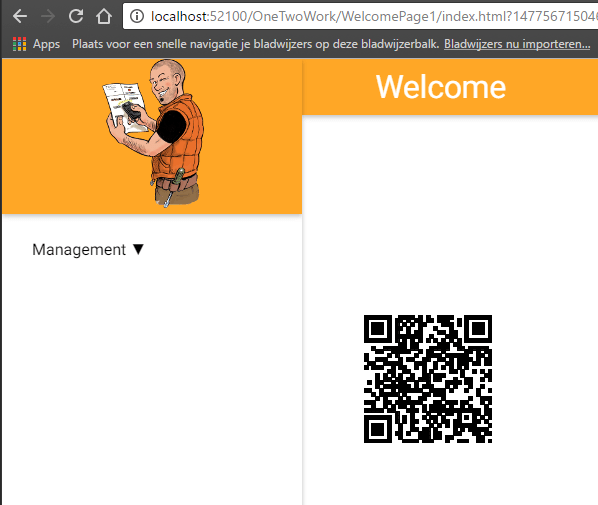
B4J: ABMaterial building a QR Code component

qrcodecomp

On the B4J forum, liulifeng77 asked the question how he could draw a QR Code in an ABMaterial web page.

I had 5 minutes to spare, so I created the QRCode component using ABMCustomComponent. It is using this javascript library: https://github.com/davidshimjs/qrcodejs

The component class CompQRCode:

'Class module
Sub Class_Globals
     Public ABMComp As ABMCustomComponent
     Public myText As String
   Public myWidth As Int
   Public myHeight As Int
   Public myColorDark As String
   Public myColorLight As String
   Public myCorrectLevel As String
End Sub
'Initializes the object. You can add parameters to this method if needed.
Public Sub Initialize(InternalPage As ABMPage, ID As String, text As String, width As Int, height As Int, colorDark As String, colorLight As String, correctLevel As String)
     ABMComp.Initialize("ABMComp", Me, InternalPage, ID)
     myText = text
   myWidth = width
   myHeight = height
   myColorDark = colorDark
   myColorLight = colorLight
   myCorrectLevel = correctLevel
End Sub
Sub ABMComp_Build(internalID As String) As String
  Return $"
<div id="${internalID}svg"/></div>
<script>var qrcode${internalID};</script>"$
End Sub
' Is useful to run some initalisation script.
Sub ABMComp_FirstRun(InternalPage As ABMPage, internalID As String)
   Dim script As String = $"qrcode${internalID} = new QRCode(document.getElementById("${internalID}svg"), {
  text: "${myText}",
  width: ${myWidth},
  height: ${myHeight},
  colorDark : "${myColorDark}",
  colorLight : "${myColorLight}",
  correctLevel : ${myCorrectLevel}
});"$
     InternalPage.ws.Eval(script, Array As Object(ABMComp.ID))
     ' flush not needed, it's done in the refresh method in the lib
End Sub
' runs when a refresh is called
Sub ABMComp_Refresh(InternalPage As ABMPage, internalID As String)
   Dim script As String = $"qrcode${internalID}.clear();
   qrcode${internalID}.makeCode("${myText}");"$
     InternalPage.ws.Eval(script, Array As Object(ABMComp.ID))
End Sub
' do the stuff needed when the object is removed
Sub ABMComp_CleanUp(InternalPage As ABMPage, internalID As String)
End Sub

Usage (if you want to change its text at run time, put the declaration in Class_globals):

Dim QRCode As CompQRCode

In BuildPage() load the javascript library:

page.AddExtraJavaScriptFile("custom/qrcode.min.js")

In ConnectPage():

QRCode.Initialize(page, "qrcode", "Alwaysbusy's ABMaterial", 128,128, "#000000", "transparent", "QRCode.CorrectLevel.H")
page.Cell(3,1).AddComponent(QRCode.ABMComp)

Et voila, another new component!

Alwaysbusy

Click here to Donation and support ABMaterial

B4J: ABMaterial Public 1.22/Donators 2.00 now released

It has been a long night to get everything ready, but I’m happy to release the new version(s) of ABMaterial for B4J!

2.00 is a major release.  Lots of new stuff and some changes that were really needed in preparation of the upcoming (ABMaterial Abstract Desinger) ABMAD tool.

Highlights of the releases:

1.22: New component ABMPatternLock

ABMPatternLock is yet another authentication method you can use based on the popular Pattern Lock you see in e.g. Android.

patternlock

1.22: ABMContainer can collapse

ABMContainer can be initialized as a collapsable component.  As a collapsable has a header and a body and clicking on the header will collapse/expand the body.  This can be used as an alternative for an ABMCard so you can build your own.

1.22: Support for Font-Awesome icons

If you set: page.UseFontAwesome = true then you can, next to the material icons, also use the Font Awesome Icon library (634 icons in used version Font Awesome 4.6.3)
See fontawesome.io for a list of icons.

fontawesome

2.00: New component ABMChronologylist

The ABMChronologyList is a vertical timeline component. Useful to give an overview of a limited period. It is device aware so e.g. on a phone, all items will be one under each other.

chronology

2.00: New helper ABMSideBar

In ABMaterial 2.00, you will be able to define multiple side bars (sliding in from the right). I’ve tried to mimic the usage of ABMSideBar as much of the existing Side Navigation menu. The tricky part was making it work well with the NavigationBar, on all screensizes.

Check out the online demo abmaterial.com or download your free copy from the B4J website.  Make sure you read the included README.TXT files.  It contains some important info and shows some tips and tricks.

That’s it for now.  Next big release will be all about ABMAD. Until next time!

Alwaysbusy

Click here to Donation if you like my work

B4J: Future steps for ABMaterial

evolution

As ABMaterial has grown to a production ready framework for WebApps using B4J, I recently started a poll on the B4X forum to find out what could be the next steps in its evolution.

I came up with 3 things to do. They would require about the same develop time, but it could be useful to see what the actual users of ABMaterial would like me to work on next.

The possible choices were:

1. ABMXPlay
This is the component you have seen some demos of and will be more for game developers. It still needs a lot of attention before it can be released.

2. B4JS
The Basic to Javascript transpiler is now in its very early stages. It is a tough one to write without finishing ABMXplay first, as the ABMXPlay component would be the first to really benefit from it. The B4J core functions have been covered, but big parts of all ABMComponents need to be refactored to start using B4JS.

3. ABMaterialAbstractDesigner
A full blown Abstract Visual Designer like the one in B4J. This is NOT a code generator but the real deal. Code generators may look nice at first sight, but  have a huge disadvantage: they go one way. ABMAbstractDesigner would work like the B4X ones: you create a layout, develop, change the layout, continue to develop and so on without losing what you have written in code. I’ll use the grid designer I’ve shown as a proof of concept in another post + the possibility to put ABMComponents on them. I’ve done some tests this weekend and it would work very similar as the other B4X tools.

4. Other (please specify)

The poll is now nearly ended and besides some interesting messages with excellent pointers, it was quite obvious from the beginning that the ABMaterialAbstractDesigner (will need a working title for this project, lets call it ABMAD for now…) would be the next part I’ll be working on. (Almost 75% in the poll at the time of writing).  This was also my preferred choice as one user did not really have the patience to wait for me and started to write some kind of code generator.  However, his limited knowledge of the ABMaterial framework has the potential of starting to reflect bad on ABMaterial itself so it is time for me to jump in.

Making ABMAD will happen in a couple of logical steps:

  1. Making the ABMaterial components ready for a designer.  This will ask for some (minor) changes to them so they can be serialized and expose their properties to the designer.
  2. Making a grid builder.  This is the biggest step new users have to overcome nowadays.
  3. Making a properties view for the components.
  4. Drag/Drop facilities to add components to specific cells
  5. Let the ABMaterial library communicate with the Designer output in a similar way as B4X does now.

This will not happen overnight, but the benefits for ABMaterial programmers will be substantial.  This will NOT be a simple code generator. ABMAD will work bidirectional.  And you’ll be able to make layouts in ABMAD and mix them with manually written code like you can do in B4X/ABMaterial now.

Note: To avoid future misunderstandings, the license of ABMaterial 2.0 will include the following statement:

4. YOU AGREE NOT TO DISTRIBUTE, FOR A FEE, AN APPLICATION USING THE LIBRARY THAT, AS ITS PRIMARY PURPOSE, IS DESIGNED TO BE AN AID IN THE DEVELOPMENT OF SOFTWARE FOR YOUR APPLICATION’S END USER. SUCH APPLICATION INCLUDES, BUT IS NOT LIMITED TO, A DEVELOPMENT IDE OR A B4J SOURCE CODE GENERATOR.

Let me explain. The philosophy of ABMaterial (and myself) is giving anyone the chance to easily build great WebApps without having to spend any money. One of the reasons I picked B4J was because it is free. Those who can spare something, donate to stimulate my continuation on the project and in so help giving other not so fortunate people an equal chance to grow. Any derived development tool or generator that uses ABMaterial must follow this philosophy so the tool must be available with 100% of its features for free (not even a ‘limited’ free version is acceptable).

This has no impact on whatever WebApp you make with ABMaterial, but is solely a protection against some ‘money-grubber’ who sees the potential of the ABMaterial framework and thinks of making some easy money using my engine by simply writing a layer above it. Just to be clear, ‘FEE’ here means ANY form of payment or compensation, donations included.

So now that this is out of the way, I think it’s time to step up to the drawing board and start to make some decisions on how ABMAD will look like.

Fun times ahead!

Alwaysbusy

Click here to Donation and support ABMaterial


B4J: Creating your own components in ABMaterial

abmcustgauge

Although ABMaterial has already a lot of components build-in, sometimes you just need a specific one.  I had a question on the B4J forum from CGP who needed a Gauge component.

So let’s build one! CGP had found a very nice library JustGage that would allow him to get the Gauge he wanted. Its value had to be updateable from within B4J, and this was a bit tricky. It looked like we have to be a bit creative because this javascript library did not connect its parent tag with the created JustGage.

We will have to keep track of the JustGage variable ourselves by adding a script tag in the build:

Sub ABMComp_Build(internalID As String) As String
  Return $"<div id="${internalID}"></div><script>var _${internalID};</script>"$
End Sub

The rest of the code is straight forward and we can just follow the javascript instructions and add them in our relative events.

An ABMaterial custom component has 4 important events:

ABMComp_Build(): This is where we have to add the html tag (anchor) for the new component.  In this particular case we also have to add a <script> tag that will hold our justGage variable.  We can then later use this variable to update the Gauge chart.

ABMComp_FirstRun(): Here we can add a script that will run, well, at first run. In most cases, this is where we add the libraries javascript initialization code. The B4J $””$ Smartstrings are in methods like this particulary handy. Use them!

ABMComp_Refresh(): The place where we can adjust properties of the javascript component.  Like for this component, we’ll adjust the value of the gauge.

ABMComp_CleanUp(): An event that is raised when the component is removed.  Could be useful to do some cleanup in the html of set javascript variables to null.

Here is the complete B4J code for our customGauge component:

Sub Class_Globals
   Public ABMComp As ABMCustomComponent
  Public myValue As Int
  Public myLabel As String
End Sub

'Initializes the object. You can add parameters to this method if needed.
Public Sub Initialize(InternalPage As ABMPage, ID As String, value As Int, name As String)
  ABMComp.Initialize("ABMComp", Me, InternalPage, ID)
  myValue = value
  myLabel = name
End Sub

Sub ABMComp_Build(internalID As String) As String
  Return $"<div id="${internalID}"></div><script>var _${internalID};</script>"$
End Sub

' Is useful to run some initalisation script.
Sub ABMComp_FirstRun(InternalPage As ABMPage, internalID As String)
  Dim script As String = $"_${internalID} = new JustGage({
  id: "${internalID}",
  value: ${myValue},
  Min: 0,
  Max: 100,
  relativeGaugeSize: true,
  title: "${myLabel}"
  });"$

  InternalPage.ws.Eval(script, Array As Object(ABMComp.ID))
  ' flush not needed, it's done in the refresh method in the lib
End Sub

' runs when a refresh is called
Sub ABMComp_Refresh(InternalPage As ABMPage, internalID As String)
  Dim script As String = $"_${internalID}.refresh(${myValue});"$
  InternalPage.ws.Eval(script, Null)
End Sub

' do the stuff needed when the object is removed
Sub ABMComp_CleanUp(InternalPage As ABMPage, internalID As String)

End Sub

Now, how do we use our new component in our B4J ABMaterial WebApp?

First, we’ll need to make our custGauge a global variable on the page:

Sub Class_Globals
  Dim custGauge As CustomGauge
  ...

Next, we add the justGauge libraries in the BuildPage().  We’ve placed them in \www\js\custom folder so we can add:

Sub BuildPage()
  ...
  page.AddExtraJavaScriptFile("custom/justgage.js")
  page.AddExtraJavaScriptFile("custom/raphael-2.1.4.min.js")
  ...

In the ConnectPage, we’ll create the actual Gauge and we add a button so we can change its value:

Sub ConnectPage()
  ...
  custGauge.Initialize(page, "custGauge", 25, "Test")
  page.Cell(7,1).AddComponent(custGauge.ABMComp)

  Dim custGaugebtn1 As ABMButton
  custGaugebtn1.InitializeRaised(page, "custGaugebtn1", "", "", "BUTTON", "")
   page.Cell(7,1).AddComponent(custGaugebtn1)
   ...

And finally we add out button code to adjust the value of the Gauge:

Sub custGaugebtn1_Clicked(Target As String)
   custGauge.myValue = Rnd(10,100)
   custGauge.ABMComp.Refresh
End Sub

And just like that, it looks like a fun new component we’ve got in B4J ABMaterial!

Until next time,

Alwaysbusy

Click here to Donation and support ABMaterial


B4J: ABMaterial Public 1.12/Donators 1.20 now released

So, what happened to 1.09, 1.10 and 1.11?
Version 1.09 does not exist. I’ve changed it to 1.10 so I can use the major number as the main release update and the minor number for maintenance releases. e.g. maintenance releases for 1.10 are 1.11,1.12, etc… The next big release is 1.20.

Highlights of the releases:

All components are fully dynamic

In a ‘static’ page, all the components are written in the .html file. In a ‘dynamic’ page they are not. Only when you connect as a user, the components are inserted in their browser.

This seems trivial, but this actually means we can ‘write’ components (html, css and javascript) at run-time, depending on e.g. the user that logged in. Some user is allowed to see one chart, another user another chart. Or one may be able to delete a record from your database, another is not. Or showing a certain modal sheet depending on the user without having to add all possibilities in the HTML. Or show the page in different languages depending on who logged in!

New component ABMTimeLine

ABMTimeline is a component to present a time line of events. Using the ABMTimeLineElement you can create events, with some assets like images.

abmaterial-abmtimeline

New component ABMFlexWall

ABMFlexWall is a simple galarie component for images.  Together with the IsMaterialBoxed=true setting, it creates an easy to use image wall.

abmaterial-flexwall

Speed, the need for speed…

Following all the guidelines of Google, ABMaterial is one of the fastest framesworks around.  Not only in time of development, but this is certainly the case for the user experience. And all done in the background for you!

googletest

Firebase Auth and Storage support (1.20)

ABMaterial is always on top of new technologies.  Latest in line is support of Googles Firebase API. You can use Firebase Auth to login to your ABMaterial (1.20) WebApp and with Storage, you can upload/download files with ease. Together with B4X Firebase support, you can build the most powerful apps ever.

New components ABMSVGSurface, ABMFileInput, ABMTableMutable and ABMPatternLock (1.20)

Always on the move, new components are introduced with every release.  Donators can find more info on these new components in their mail.  More on this blog when 1.20 is released to the public.

So check out the online demo abmaterial.com or download your free copy from the B4J website

Until next time!

Alwaysbusy

Click here to Donation if you like my work


B4J: ABMaterial Public 1.07/Donators 1.08 now released

ABMaterial public version 1.07 is now available from the B4J website!

What’s new:

ABMGenerator object: allows generating CRUD and messagebox modal sheets fast

Given a set of parameters in a couple of lines of code, ABMGenerator can generate several hundreds of lines of B4J code that only need to be tuned by the programmer to its specific wishes.

Refer to this post for more info.

Infinite Scrolling pages (e.g. like Twitter or Facebook)

With just a couple of lines code, you can create Infinite Scrolling Pages with ABMaterial.

See this post for more info and a demo.

Support for Google Analytics

more info and a tutorial, check out this previous article.

New component ABMSocialShare


abmaterial-socialshare

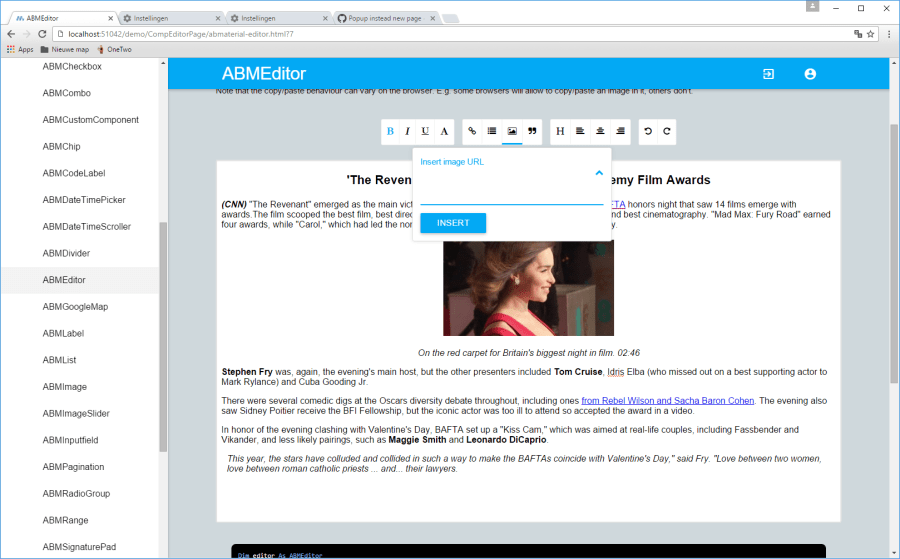
New component ABMEditor

abmeditor

Read the README1.07.TXT for the full release notes.

Download ABMaterial Public version 1.07

Version 1.08 is going to be all about speed! But I’ll post a seperate article on my experiences here later on this. A couple of new components off course and some new functionalities in the ABMNavigationBar. Donators should have received this version by now. (mail me if you didn’t).

Alwaysbusy

Click here to Donation if you like my work


B4J: ABMaterial Public 1.06/Donators 1.07 now released

The public version 1.06 of ABMaterial is now available from the B4J website!

Some highlights on this public release:

Theme and controls have a Colorize() method to quickly change a theme
Getting more out of the Theme system. Just by using the one single line in B4J, theme.Colorize(myColor), you can change the base color of ABMaterial. You can of course still tune it manually.

Colorizing a theme in one line in ABMaterial

ABMDataTimeScroller
New component to let the user choose a date through a scroller.  Can be used to get the date, the time or both. See the demo for more.

The DateTime Scroller of ABMaterial

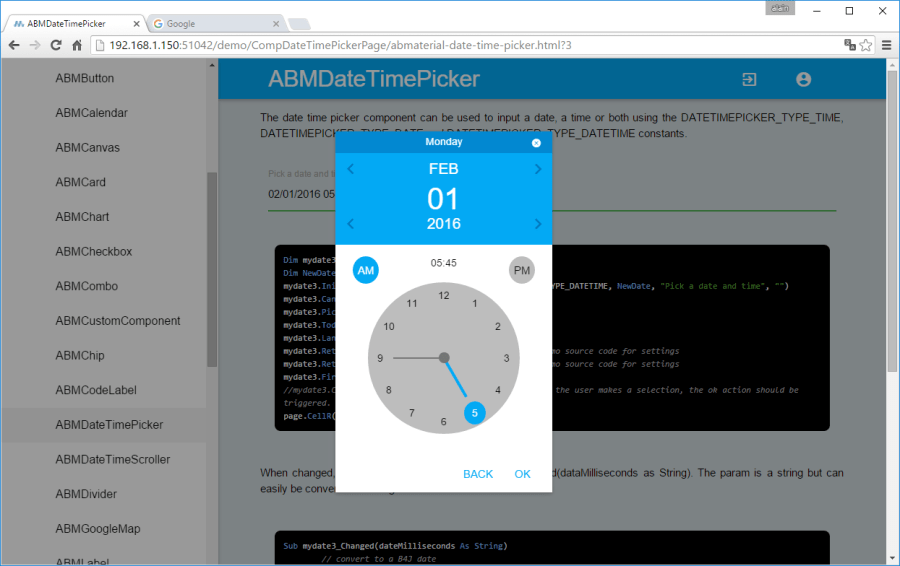
ABMDateTimePicker
Alternative component to let the user choose a date/time.  The date can be picked on a calendar, the time on a clock. See the demo for more.

The Date picker of ABMaterial

The Time picker of ABMaterial

Speed gain by using minified versions of the javascript/css files
This is just the first step in speeding up ABMaterial and the user experience both on a desktop and a mobile device. I continue searching for methods to make ABMaterial even faster!

Read the README1.06.TXT for the full release notes.

Download ABMaterial Public version 1.06

Donators will receive an email with the download link to ABMaterial 1.07 containing two new controls, ABMEditor and ABMSocialShare.  A optimized TreeView and Google Analytics support is also included!

Happy programming!

Alwaysbusy

Click here to Donation if you like my work